Bulk URL Checker: Check Links from Excel and Export CSV
Copy URLs from Excel, check them in bulk and export CSV. Follow a tested example and learn what redirects, status codes and response times can tell you.

Like it ? share it
Migrations, backlink audits and pre-launch checks all end at the same place: a spreadsheet column full of URLs and a question about all of them. Which ones still answer?
The Bulk URL Checker takes a pasted list, checks the responses, and exports CSV. You can copy URLs from Excel or another spreadsheet, then filter the results back in your sheet.
Prepare the URL column
Start with one complete web address per cell. Copy the cells without the column header, then paste one address per line. For example:
https://www.enfect.com/
https://www.enfect.com/qrdecoder
https://www.enfect.com/content-demo-missing-20261008
The third address is a deliberately nonexistent path used to demonstrate a 404. It is not a real page that needs repairing.
Check what you are copying. An Excel cell displaying “Visit store” may hide a hyperlink to a different value. Copying the displayed text is not the same as extracting the target address. Microsoft's HYPERLINK documentation distinguishes the link location from its friendly name.
The tool accepts URL text; it does not upload and parse an .xlsx workbook or repair formulas that refer to another workbook. Keep an original copy of your sheet so you can match checked URLs back to their source rows.
Run the check and export CSV
- Open the Bulk URL Checker.
- Paste the addresses into URL LIST.
- Select LOAD LIST and check that the loaded count matches your intended list.
- Select START CHECKING and keep the tab open until the progress reaches 100%. You can pause and resume a longer run.
- Select EXPORT CSV after the run finishes.
- Open the CSV in Excel, or import it as comma-separated UTF-8 text if Excel puts everything in one column. Filter HTTP Status and keep the input URL visible beside each result.
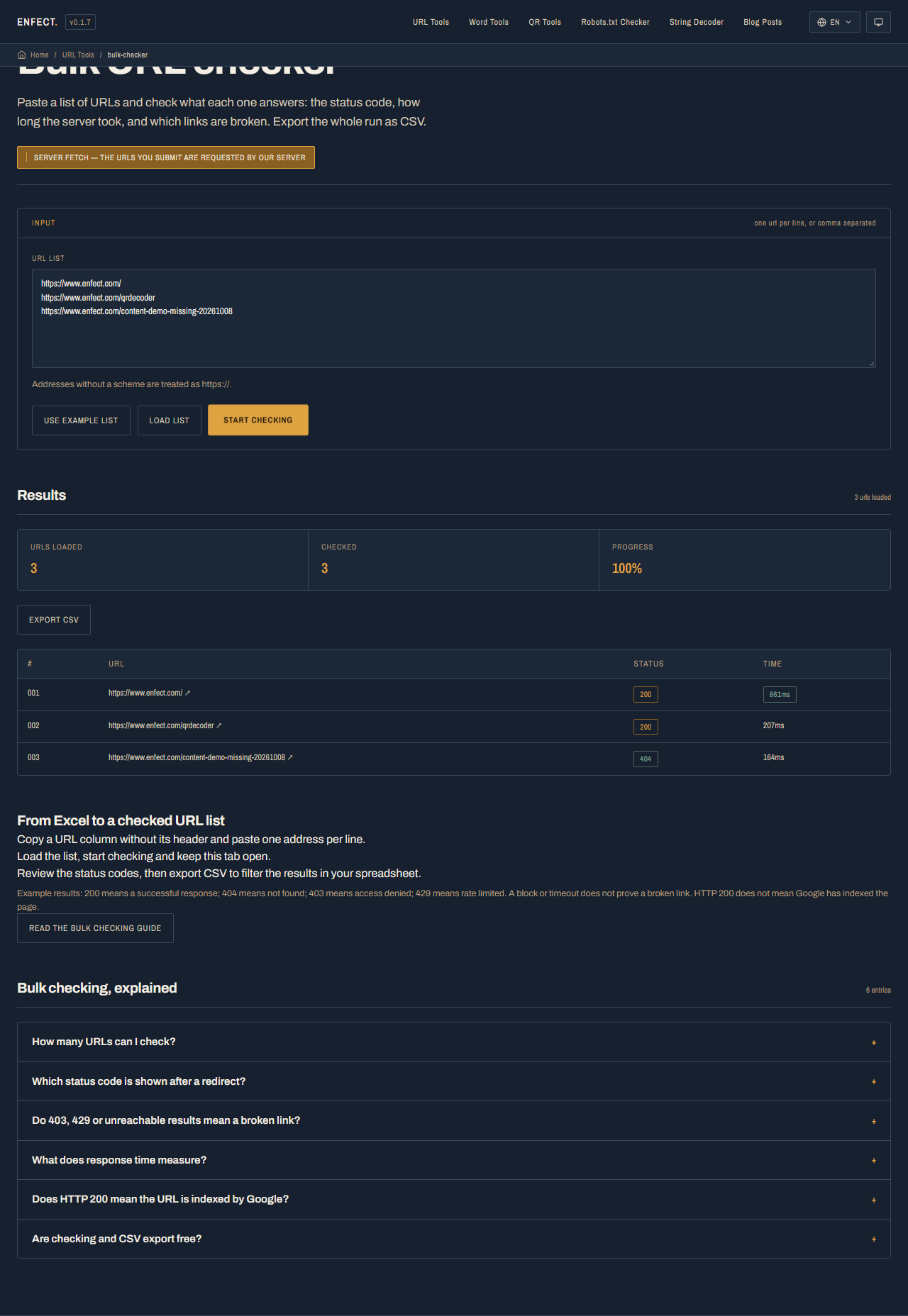
The live run on October 8, 2026 produced this CSV:
URL,HTTP Status,Status Text,Response Time (ms)
"https://www.enfect.com/",200,OK,861
"https://www.enfect.com/qrdecoder",200,OK,207
"https://www.enfect.com/content-demo-missing-20261008",404,Not Found,164
Those response times belong to this run. Repeating the check can give different values. This small example demonstrates the workflow; it does not establish how quickly a list of 500 URLs will finish.
Turn the results into a review list
| Result | What this check established | What to do next |
|---|---|---|
200 |
The request received a successful response | Check the page content when accuracy or indexing matters |
404 |
The requested resource was not found | Check for a typo, remove an obsolete link, or choose a relevant replacement |
403 |
The request was refused | Open a sample manually; permissions or a firewall may block automated access |
429 |
The server rate limited the request | Wait and retry a smaller batch |
500 or 503 |
The server returned an error | Retry, then investigate server logs for pages you control |
| Unreachable or timeout | This run could not obtain a response | Recheck DNS, availability and access before calling the link permanently broken |
Filter the failures first and review the patterns. If many URLs on one domain return 403, that may be one access restriction rather than dozens of missing pages. If only one returns 404, start with its exact path.
A 404 on an old page may justify a redirect when a relevant replacement exists. For a page intentionally removed with no replacement, remove the stale link instead of redirecting every missing address to the homepage.
What happens to redirects
The checker follows redirects and reports the final response. An old URL that redirects to a working page can therefore appear as 200.
The CSV has four columns: input URL, HTTP Status, Status Text and Response Time. It does not include the final destination URL or every redirect hop. For migration checks, open the old URL in the Redirect Detector and compare the destination with the address you expected. A final 200 alone cannot confirm that the redirect went to the correct page.
Timing, request limits and indexing
The checker processes five URLs at a time. A slow target can hold up a batch. Each request has a 10-second timeout; a failed or unsupported HEAD request is retried with GET, so one URL can take about 20 seconds. Total time depends on the list and the servers being checked.
The response-time column measures a server request until the response headers arrive and may include redirects. It does not measure a visitor's full page load, JavaScript execution or LCP. Use it to find URLs worth another look, rather than treating one value as a universal speed grade.
HTTP 200 also does not prove that Google indexed a URL. A page can return 200 while containing noindex, pointing its canonical at another page, or displaying an error message. For pages you control, use Search Console URL Inspection and check the actual content and indexing directives. Google's HTTP status guidance explains how responses affect crawling.
For a site-wide audit, first get a URL list from your sitemap using the Sitemap URL Extractor, then follow the same review process. The sitemap audit guide covers which URLs belong in that list.