Multiple QR Codes in One Image: Read Each Code Separately
Read multiple QR codes in one image without mixing their results. Use separate crops, preserve each border, and record the text for each code.
Like it ? share it
Keep the source image. Make a separate crop for each QR code, then record the decoded text beside that crop.
One returned result does not establish that the image contains only one code. It also does not identify which printed label owns that result.
The Enfect QR decoder reads an image and shows its payload. The payload is the text inside the code. This procedure uses a separate image editor for crops.
Procedure: identify each code before you decode
- Save the original image without changes.
- Give each visible code a position label, such as left or right.
- Record the printed caption beside each position.
- Make one crop around each complete code.
- Keep clear space around all four sides.
- Save each crop with its position label in the filename.
For example, a flyer can contain a registration code and a menu code. A successful menu result does not answer the registration question.
The position record prevents that mistake. A filename such as flyer-left.png connects a result to the part of the source you selected.
The clear space is the quiet zone. DENSO WAVE specifies a margin of four modules on each side of a standard QR code. A module is one small square in the pattern. See its code area guide.
A crop must retain the complete pattern. If its edge is missing, the white border guide explains why added space cannot replace missing data.
Procedure: record one result per crop
- Open the QR image decoder.
- Select Upload.
- Select the crop for the left code.
- Read Decoded payload.
- Record that text beside
flyer-left.png. - Select the crop for the right code.
- Record its text beside
flyer-right.png. - Compare both records with the printed captions.
Decoding reads the image. Open URL is a separate action. A valid decoded address can still lead to the wrong service.
If the code is inside a PDF, first save the code area as an image. The same-device guide gives the capture steps.
A controlled image with two different results
On November 16, 2026, we made two synthetic QR codes with ZXing WASM 2.2.0. Each contained a different example address.
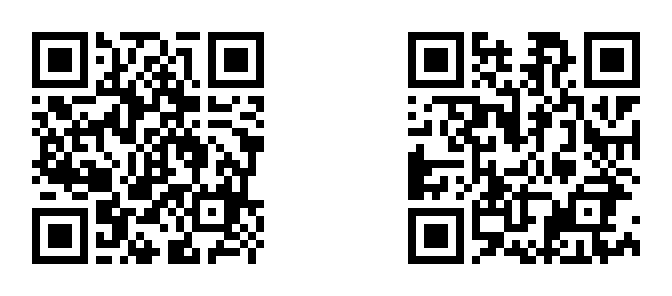
The left code contained https://example.com/ticket-a. The right code contained https://example.com/ticket-b. These addresses are text fixtures, not working tickets.
The combined image measured 672 by 296 pixels. We kept the writer's quiet zones and an additional gap between the codes.
We read the same image with two result limits. Then we read a separate crop of each code.
| Test input | Maximum results | Text returned in this test |
|---|---|---|
| Complete two-code image | 1 | https://example.com/ticket-a |
| Same complete image | 2 | Both example addresses |
| Left crop | 1 | https://example.com/ticket-a |
| Right crop | 1 | https://example.com/ticket-b |
The complete image did not change between the first two tests. The result limit changed.
The library's usage reference documents the result array and reader options. A limit of one cannot provide an inventory of every symbol.
The first row records one observation. It does not establish a universal left-first order or a rule that the clearest code always wins.
All five assertions passed with Node.js 24.14.1 on Windows. Two runs produced identical result records. This experiment used the installed library, not Enfect's deployed page or a phone camera.
Keep the result attached to its source
This fictional review table records the expected purpose separately from the decoded text:
| Crop | Printed caption | Expected purpose | Result |
|---|---|---|---|
flyer-left.png |
Registration | Registration service | Compare the complete address |
flyer-right.png |
Menu | Restaurant menu | Compare the complete address |
A hostname that looks familiar does not prove the correct page. The destination path can identify a different event or an old menu.
If both crops contain the same text, record that fact. Two printed symbols can contain the same payload. Do not invent a second destination.
If one crop fails, keep its row as unresolved. The successful crop does not replace the missing result.
An OpenCV discussion reports difficulty with several small codes in one large image. A second discussion describes different results across readers after isolating a code.
These are historical user reports. They support separate input records, not a diagnosis of your image or a promise that cropping repairs it.
After the image test
For public web addresses, the link inspection guide explains the next destination checks.
Several public URLs can also enter the Bulk URL Checker for a response check. That sends the addresses to Enfect's server. Private ticket and login URLs need a separate access decision.
Image decoding, destination access, and ticket validity are separate checks. A successful image result proves none of the later steps.
For printed links after a site move, the migration audit compares each old address with its planned destination.